 Project Commander Docs
← Back to site
Project Commander Docs
← Back to site
Alerts Tab — Feature Guide
What it's for
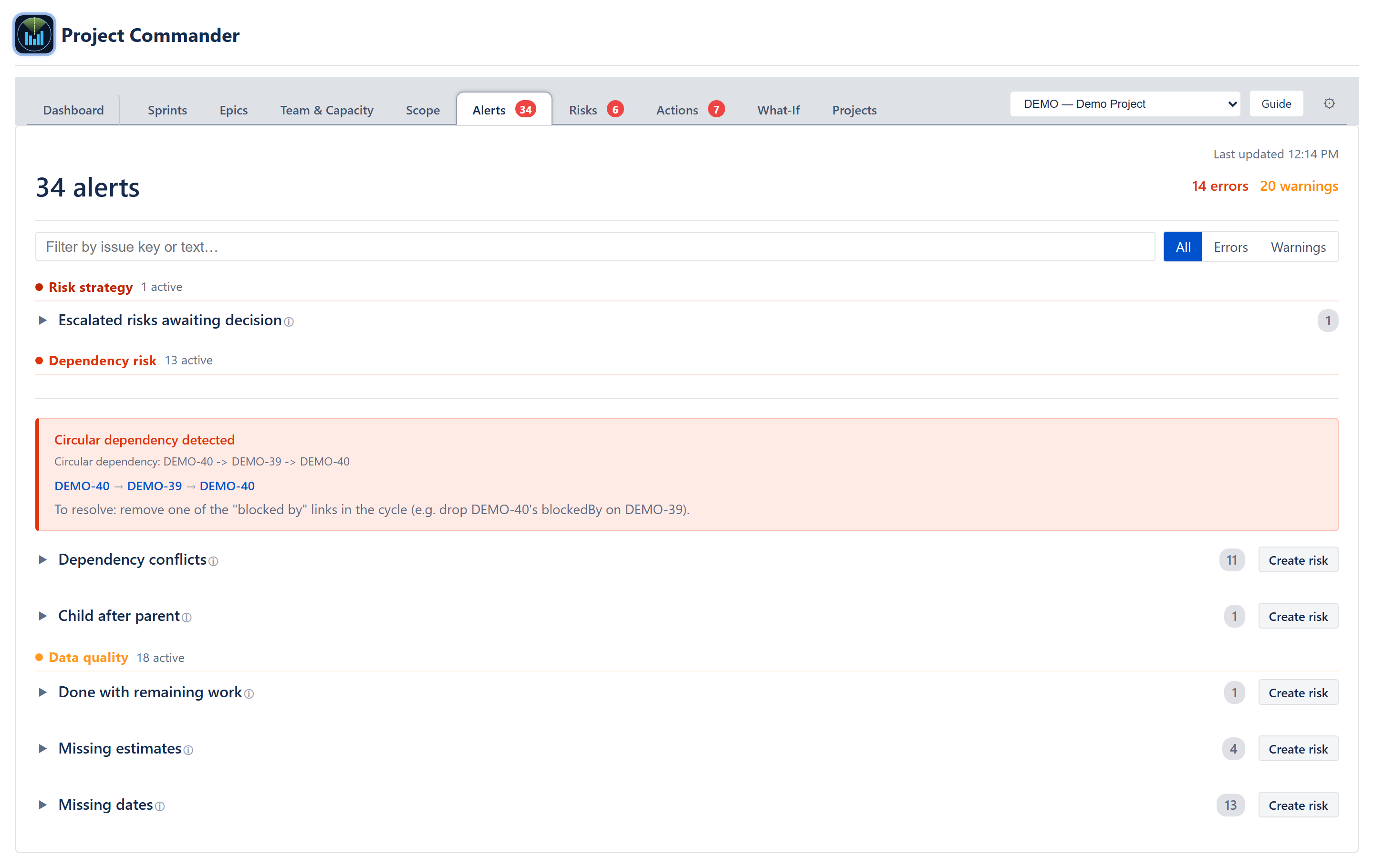
The Alerts tab surfaces data-quality and dependency problems across every issue in the project — sprints, backlog, and any issues returned by the project's JQL filter. It tells the user which issues need attention before delivery: items closed without burning down their estimate, blockers that finish after their dependent starts, blockers and dependents in the wrong sprints, child issues whose due dates outlive their parents, missing planning fields, and circular dependency chains.
The audience is scrum masters, project managers, and release leads. Alerts is the deterministic counterpart to the AI-driven Risks tab: every alert here is produced by a rule, every rule has a single threshold, and the same rule that fires on this tab also feeds the Dashboard's Alerts and Dependency Conflicts diagnostic rows.
The tab assumes the user has a JQL filter or sprint board configured. With no filter and no issues, an explanatory empty state replaces the alert list.
Header / summary line
A summary line sits at the top of the panel:
- Total active alerts — sum of the error- and warning-severity items. (Dismissing a row updates the per-category N active counts but does not change this top summary.)
- Errors — red count: things the system treats as breakage (done with remaining work, dependency conflicts with explicit date violations, circular dependencies).
- Warnings — amber count: things that are merely worrying (overdue, child after parent, missing dates / estimates).
- Show dismissed / Hide dismissed — a toggle link that appears whenever any alert has been dismissed. Toggling reveals dismissed items in faded form with a Restore button per row.
The summary numbers always reflect the unfiltered totals so the user knows the overall state of the project even while reading a filtered view.
Search and severity filter
Below the summary, a Filter by issue key or text… search box narrows the visible alerts to rows whose issue key or message contains the typed string. Three severity pills sit next to it — All (default), Errors, Warnings — and AND-combine with the search. Both controls are local to the tab; they do not affect the summary numbers or the tab badge.
Domains and categories
Alerts are grouped into three top-level domains, each with category sub-sections.
Risk strategy domain (red accent)
Surfaces decisions on the Risks tab that are waiting on someone. Both categories link a row click back to the Risks tab with the affected risk scrolled into view.
- Escalated risks awaiting decision — every open risk whose response strategy is Escalate. Message reads Awaiting decision from {Escalation owner} (or Awaiting escalation owner when none is set). Severity: error (these count toward the error total and the nav badge).
- Risk review due — every open Defer risk (or Accept risk with a review-by date) where today has reached review-by minus 3 days. Past review-by renders as error severity; within the lead window renders as warning.
Dependency Risk domain (red accent)
Where blockers, dependents, parents, and children create timing problems.
- Circular Dependencies — follows the blocks / is blocked by links to find loops. The cycle path is rendered as a chain (e.g., PROJ-1 → PROJ-2 → PROJ-3 → PROJ-1) with each key linked to the issue. Cycles are deduplicated so A → B → A and B → A → B count once. A recovery hint sentence appears under the chain ("To resolve: remove one of the 'blocked by' links in the cycle (e.g. drop PROJ-1's blockedBy on PROJ-2)") so the user knows which edge to break first. Severity: error.
- Dependency Conflicts — fires when a blocker's resolved due date is later than the blocked issue's start date (error), when a blocker sits in a later sprint than the blocked issue (error), or when the blocker's status is unknown and dates are missing (warning). Also fires (as an error) as soon as the blocked issue's start date has passed while the blocker is still open — there is no tolerance window. The message reads Blocked by {KEY} — start date passed but blocker still open.
- Child After Parent — child due date later than parent due date. Severity: warning. Message includes the day delta.
Data Quality domain (orange accent)
Where the issue itself is malformed or in an inconsistent state.
- Done with Remaining Work — issue is in a done-set status (done, closed, resolved, complete, completed) but still has remaining work left on it. Severity: error. The remaining time is formatted human-friendly (2d 3h 45m).
- Missing Estimates — active or future-sprint issue that is not done has no estimate at all. In points mode this means it has no story points; in time mode it means it has neither an original nor a remaining time estimate. Severity: warning.
- Missing Dates — active or future-sprint issue that is not done is missing its start date, its due date, or both. Severity: warning. The message specifies which field is missing.
- Unassigned — active or future-sprint issue that is not done has no assignee. Severity: warning.
Overdue items render in their own Delivery risk section on this tab (purple header, category Overdue), and are also summarised in the Dashboard's Project Statistics table.
Per-row affordances
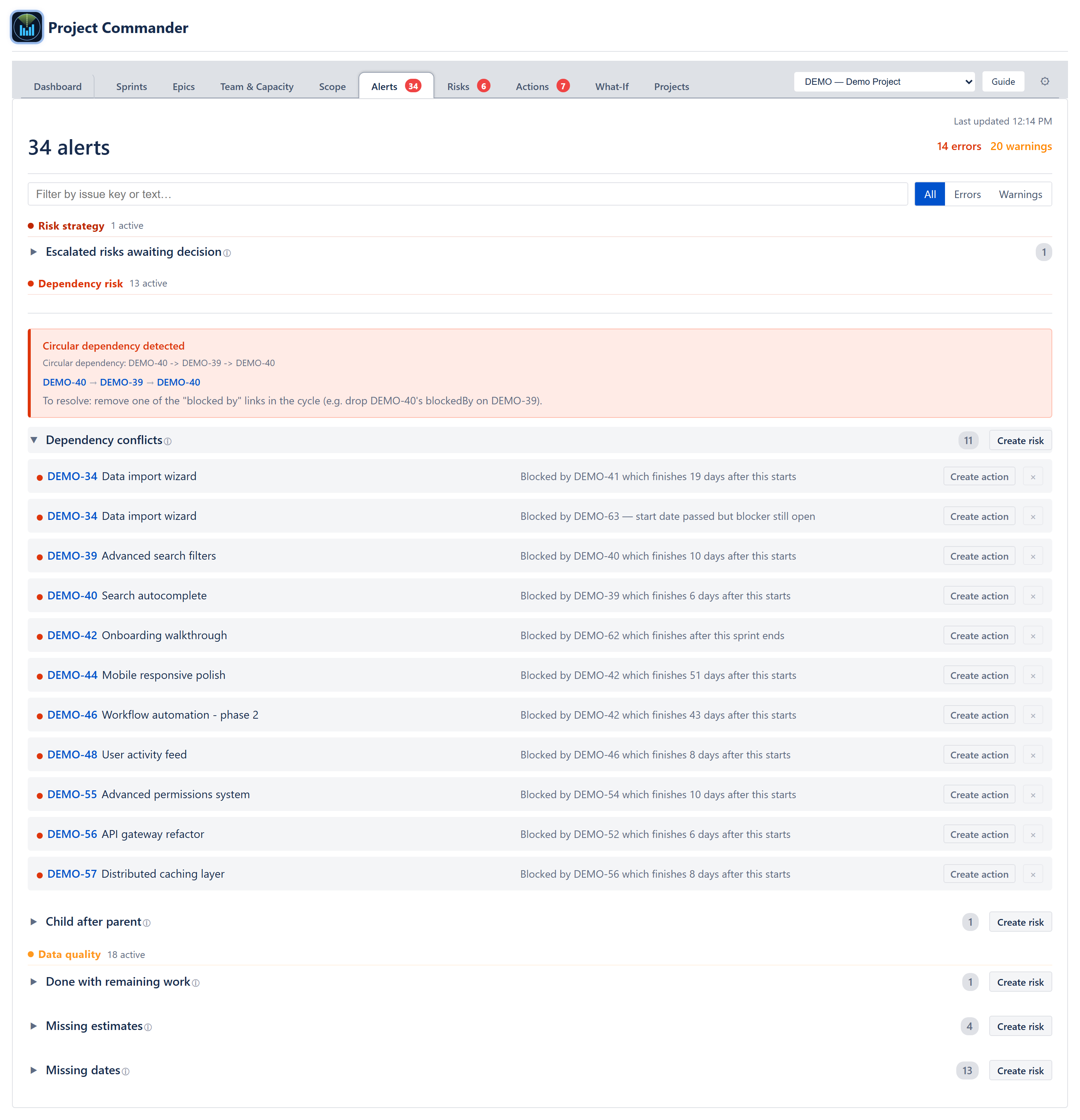
Each alert row contains:
- Severity dot — small red or amber dot on the left.
- Issue key — clickable link in monospace blue. Clicking it opens the issue in the Project Commander side panel.
- Issue summary — issue title plus the alert message (e.g., Blocked by PROJ-456 which finishes 5 days after this starts).
- Create action — a small button (visible only when action creation is available) that creates an action item on the most relevant sprint scope: the alert's sprint, or the active sprint, or the next future sprint, or Project scope as a fallback. The action title is auto-populated from the alert. A toast confirms.
- Dismiss (×) — appears on hover. Clicking it dismisses the alert. The dismissal is saved to the app's Atlassian Forge storage (held in an in-memory cache loaded at startup, so it restores instantly and survives reloads on the same Jira instance). Removed on uninstall.
Category headers
Each category is collapsible. The header shows the category title, the active alert count, and a ▶ / ▼ caret. A Create risk button at the right of the header appears when a Dependency risk or Data quality category has alerts; it is not shown on the two Risk strategy categories (Escalated risks awaiting decision, Risk review due), which are already about existing risks. Clicking it opens the Risks tab pre-populated with: the category title (e.g., Circular dependencies detected), an evidence block listing the alerts as bullet items, and a category / probability / impact pre-mapped from a built-in category-to-risk mapping.
A category that has no active alerts but does have dismissed ones still renders its (collapsed) header so the user can use Show dismissed to restore them. A category with no alerts at all is hidden entirely.
Empty / loading / error states
- Loading — Loading issues… while the JQL fetch is in flight.
- No data + no JQL configured — No data with a hint to configure a JQL filter in Settings.
- JQL error — the error message returned by the backend.
- All clear — green check + All clear! No alerts found when the issue set produces zero alerts.
- Per-domain clean — within an open domain, if every category there is empty (or all dismissed), a small green card reads No Dependency Risk alerts (or the analogous data-quality version) so the user gets explicit confirmation rather than a silent empty section.
Cross-cutting modes and settings
- Sprint mode — controls which issues are considered active. Closed-sprint issues are excluded from missing-dates and missing-estimates checks (those are historical noise) but can still trigger done-with-remaining and dependency-conflict alerts when the violation is current.
- Estimation mode — drives which Jira field is read for Missing Estimates. In time mode, the alerts read the original and remaining time estimates; in points mode, story points.
How the numbers are computed
Every alert is produced by the alerts engine plus a dedicated circular-dependency detector. The implementation is documented in ALGORITHMS section 14c — Alerts Engine — including the sprint-boundary check inside Dependency Conflicts, the cycle deduplication in Circular Dependencies, and the JQL/sprints/backlog precedence used to merge the issue set.
Effects on other parts of the app
- Dashboard Project Statistics — the Alerts row and the Dependency Conflicts row both read the same alerts output. The Dashboard's Alerts row counts the same totals shown in this tab's summary line.
- Tab badge — the badge next to Alerts in the main navigation is the count of active error-severity alerts; warnings do not bump the badge.
- Risks tab — Create risk on a category jumps to Risks with an evidence block and pre-mapped probability / impact. Once a risk has been accepted from an alert, the link is recorded in the risk's provenance fields so the Risks card can show N alerts currently match.
- Action items — Create action puts the alert's evidence into the Actions tab on the most relevant sprint scope.
- Notifications — high-severity alerts (e.g., circular dependencies) feed the Notification engine.